Showing posts with label hard. Show all posts

Monday, September 29, 2014

Nokia N8 Format Hard Reset to Factory Settings Procedures


Uploaded with ImageShack.us


This a simple instruction on how to factory reset the Nokia N8 and restores the phone to its original factory default settings.

Factory reset through Menu Settings, this is only a soft reset and it restores all data to factory default.

1. From Main Menu go to Settings
2. Select Phone
3. Select Phone Management
4. Select Factory Settings then Delete Data and Restore


Hard Reset


Uploaded with ImageShack.us


Hard Reset
Note: This will delete all your applications installed and you may need to install it back again after the hard reset has been made. This is only advisable if you have a screen problem errors like, hang or frozen problems. So proceed with precautions.

This is how to hard reset the Nokia N8 through button combination:

* Turn off the phone.
* Press and hold the following Button keys:
o Volume Down button
o Camera button
o Menu button
Press the Power button until the phone vibrates....


Once the process completes, the Nokia N8 will then reboot, any installed data or 3rd-party applications already wipe out. You may need to re-install it back again.

Monday, September 15, 2014

Karbonn A4 Hard Reset 100 Working Solution

Karbonn A4 Hard Reset 100% Working Solution

Press Volume Down Button & Power Button for 5 Seconds.
Then It Shows Factory Test Menu Functions.
In Here Select the "Clear Flash" Option. U r Done.
Now Phone Will be Automaticaly Restarted.
Now the Phone is Ready to Use. 100% Tested Solution By Me.....

Wednesday, July 30, 2014

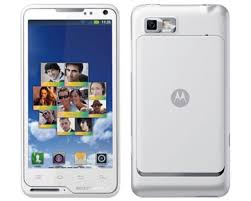
Motorola Motoluxe Xt615 Restore Factory Hard Reset Remove Pattern Lock

motorola Motoluxe Xt615 Restore Factory Hard Reset Remove Pattern Lock
Motorola Motoluxe Xt615 Restore Factory Hard Reset Remove Pattern Lock
It will remove all the data ,contacts and apps that you installed

The Hard Reset / Factory Reset operation can fix many software related errors and problems:- 
After installing bad or unsupported application into your Samsung mobile phone which causes your phone to be frozen. – Your Samsung mobile phone doesn’t respond to any order after booting because of some software errors.
– Forgotten pattern lock in Samsung Android mobile phones.
– Forgotten user code.
– Forgotten phone code.
– Before or after installing new firmware updates into your device.
– Before selling the device to Wipe all your saved data.
Motorola Motoluxe Xt615 Hard Reset Keys:
1.Power Off Your Phone
2.Press Together Volume Up + Volume Down + Power Button Until Motorola Logo Appears
3.Press Home Key To Enter In Recovery Menu
4.Select With Volume Buttons "wipe Data" And Press Power To Confirm
5.Select "yes" And Press Power To Confirm
6.Press Power To Confirm "reboot"
7.Wait Until The Phone Restarts
Notice: The hard reset operation will delete anything that are saved in your phone’s internal memory, So make a backup of your data in case you can access them.
Motorola Motoluxe Xt615 Restore Factory Hard Reset Format Phone.So lets start the Motorola Motoluxe Xt615 Restore Factory, Motorola Motoluxe Xt615 Hard Reset.Turn Off the mobile phone for few mints.Motorola Motoluxe Xt615 Remove Pattern Lock.

Tuesday, July 29, 2014

HTC Desire x hard reset

Before you buy a new cell phone or new tablet, please try the following procedure to repair your device. First charge your battery, backup your important data if possible and in most cases take out SIM and SD card. It is impossible to recover your data after doing a hard reset, so online backup is always important. For all of your data, a backup should be done on an external device, hard drive, raid system or media.

Performing a HTC Desire x hard reset Desire X factory reset

Performing a desire x factory reset using phone buttons

To hard reset HTC Desire X first power off device, or if the screen doesnt responding remove the battery.
Everything will be lost!
If you cannot turn on your phone or access the phone settings, you can still perform a factory reset by using the buttons on the phone.
Performing a factory reset using hardware buttons
If you can’t turn HTC Desire X on or access settings, you can still perform a factory
reset by using the hardware buttons on HTC Desire X.
1. Turn your Desire X off.
2. Press and hold the VOLUME DOWN button, and then press and hold the POWER button.
3. Wait for the screen with the three Android images to appear, and then release the POWER and VOLUME DOWN buttons.
4. Press VOLUME DOWN to select FACTORY RESET, and then press the POWER button.
HTC Desire X hard reset
You can return your phone to its original state, as it was when it left the factory. This is also called a hard reset. You might want to do this if you are giving your phone to a friend or relative and you want to remove all your data first, or if your phone has a persistent problem
that is not solved by powering off the phone and then powering it on again.
A factory reset will permanently erase all your personal data and customized settings, and also removes any programs you have installed. Make sure that you have backed up the information and files you want to keep.
If your phone hangs or freezes, we recommend that you do a “soft” reset instead of a hard/factory reset. To perform a soft reset, remove the battery, wait for a few seconds, and then re-install it. After re-installing the battery, turn on the phone.

Performing a Desire X factory reset via settings


The most convenient way to do a factory reset is via the phone settings.
1. Slide the Notifications panel open, and then tap Settings icon.
2. Tap Storage > Factory data reset.
3. Tap Reset phone, and then tap Erase everything.
Warning! Always turn off your device before installing/replacing the battery and SIM card.

Wednesday, July 23, 2014

Kyocera ECHO M9300 Hard Reset to Factory Settings


These is the step by step procedures on how to hard reset the Kyocera M9300 ECHO  with Android OS, v2.2 (Froyo), 1GHz Scorpion processor, Qualcomm QSD 8650 Snapdragon.


Please note: Performing a factory reset is only advisable if you want to return back the phone to its original factory default settings and also fix some abnormal functions of the device.
Just make a back up copy of all your personal data before proceeding because the result of this process will delete all data you previously installed on the device.
This is a simple guide if you want to return the device to its original factory settings again.


Factory data reset of Kyocera M9300 ECHO:

1. On the main home screen, select menu
2. Select Settings, then Privacy
3. Select Factory data reset
4. Select Reset phone
5. Enter the password if prompted, then confirm by selecting Erase everything


Kyocera M9300 ECHO Hard reset, this may help if the phone experience some hang or frozen on some applications:

1. Turn the phones power off. Take the battery out from the device, wait a couple of seconds and reinsert it back again.
2. Now, Hold the Volume Down button
3. Then press and hold the Power button until the device turns on
4. A menu will show up like: Fastbook, Recovery, Clear Storage, and Simlock
5. Just select Clear Storage by pressing the Volume Down button
6. Then press and release the Power button
7. Select Volume Up if YES and Volume Down for NO


Once the reset process is complete, the phone will then reboot to its factory fresh state settings.
Any data including third-party applications previously stored from the Kyocera M9300 ECHO already wiped or deleted.

Sunday, March 23, 2014

Samsung Galaxy Y S5360 Hard Reset Procedures

Samsung Galaxy Y S5360 Hard Reset Procedures


Warning

By performing a factory reset will delete and wipe all of your personal data, so we highly recommended to backup your important data and take the SD Card out from phone before performing factory reset.

Samsung Galaxy Y S5360 Hard Reset Procedures :

1. Power off phone
2. Press and hold Home Button ( middle ) + Volume Up + power on button
3. Wait for 5 second until Android System Recovery menu appear
4. There are 4 options

reboot system now
apply update from sdcar
wipe data/factory reset
wipe cache partition

5. Move the options to " Wipe data / factory reset " using volume down ( - ) button and menu button to confirm, because the touchscreen doesnt work in reovery mode
6. After the process done, phone will reboot.

In those steps:

1.)*2767*3855#
2.)*7465625*638*00000000*00000000#
3.)#7465625*638*00000000#

Now your phone is unlock forever Permanent

Monday, March 17, 2014

Huawei U7510 Hard Reset

Huawei U7517, U7510, U7515, U7519 u75xx Hard Reset


Turn off and turn on celular phone.
When ordering put a wrong key of 4 digits, eg 1234 and den accept
While the display says password error, press the END key twice quickly.
This will enter the phone in a special way.
Now pressed the dial pad icon (2nd icon phone left. To right)
Place * 1673492846 then press the key cursor (DPAD) down

Entering a phone hidden menu (Test Mode)
** (Do not touch anything extra if you have no experience) **

Select option 8 (Other)
Select option 1 (Reset to factory settings)
Again select option 1 (Confirm reset factory setting) ________________
When you ask a question, remember to give a detailed explanation of the problem, to make it easier to help you.

Saturday, March 15, 2014

Apple ipad hard reset


See how micro SIM cutter works microSIM for iPad and iPhone 4 TUTORIAL

If something isn***8217;t working right, try restarting iPad, force quitting an application,
or resetting iPad.


Restart iPad: Press and hold the Sleep/Wake button until the red slider appears.


Slide your finger across the slider to turn off iPad. To turn iPad back on, press and hold the Sleep/Wake until the Apple logo appears.
Force quit an application: Press and hold the Sleep/Wake button on top of iPad for a few seconds until a red slider appears, then press and hold the Home button until the application quits.
If you can***8217;t turn off iPad or if the problem continues, you may need to reset iPad.
This should be done only if turning iPad off and on doesn***8217;t resolve the problem.


Reset iPad: Press and hold the Sleep/Wake button and the Home button at the same time for at least ten seconds, until the Apple logo appears.


iPad Still Doesn***8217;t Respond After Reset

Reset iPad settings. From the Home screen choose Settings *gt; General *gt; Reset *gt; Reset All Settings. All your preferences are reset, but your data and media aren***8217;t deleted.


Resetting iPad


Reset all settings: Choose General *gt; Reset, then tap Reset All Settings.


All your preferences and settings are reset. Information, such as your contacts and calendars, and media, such as your songs and videos, aren***8217;t deleted.
Erase all content and settings: Choose General *gt; Reset, then tap ***8220;Erase All Content and Settings.***8221;


This resets all settings to their original values and erases all your information
and media.


Reset network settings: Choose General *gt; Reset, then tap Reset Network Settings.


When you reset network settings, your list of previously used networks and VPN settings not installed by a configuration profile are removed. Wi-Fi is turned off and then back on, disconnecting you from any network you***8217;re on. The Wi-Fi and ***8220;Ask to Join Networks***8221; settings remain turned on.
To remove VPN settings installed by a configuration profile, choose Settings *gt; General *gt; Profile, then select the profile and tap Remove.


Reset the keyboard dictionary: Choose General *gt; Reset, then tap Reset Keyboard Dictionary.


You add words to the keyboard dictionary by rejecting words iPad suggests as you type. Tap a word to reject the correction and add the word to the keyboard dictionary. Resetting the keyboard dictionary erases all words you***8217;ve added.


Reset the Home screen layout: Choose General *gt; Reset, then tap Reset Home Screen Layout.


Reset the location warnings: Choose General *gt; Reset, then tap Reset Location Warnings.


Location warnings are the requests made by applications (such as Maps) to use Location Services with those applications. iPad stops presenting the warning for an application the second time you tap OK. Tap Reset Location Warnings to resume the warnings.

Thursday, February 20, 2014

Videocon A20 hard reset done

videocon A20 hard reset

HTC 8X hard reset

Before you buy a new cell phone or new tablet, please try the following procedure to repair your device. First charge your battery, backup your important data if possible and in most cases take out SIM and SD card. It is impossible to recover your data after doing a hard reset, so online backup is always important. For all of your data, a backup should be done on an external device, hard drive, raid system or media.

Performing a HTC Windows Phone 8X hard reset 8x factory reset

Performing a 8X factory reset using phone buttons

Warning! All data will be lost!
1. Turn the power off.
2. Press and hold the VOLUME DOWN button, and then briefly press the POWER button. Release the VOLUME DOWN button when you see an icon on the screen.
3. Then press the following hardware buttons in this sequence: VOLUME UP > VOLUME DOWN > POWER > VOLUME DOWN.
HTC 8X hard reset
or
Reset Windows Phone 8x by HTC
On the Start screen, slide to the left.
Tap Settings > about.
Tap reset your phone, and then tap yes.
Warning! Always turn off your device before installing/replacing the battery and SIM card.
reset HTC 8x, HTC WP8x reset, reset htc x8, wp8,

Monday, February 17, 2014

HTC Inspire 4G hard reset

Before you buy a new cell phone or new tablet, please try the following procedure to repair your device. First charge your battery, backup your important data if possible and in most cases take out SIM and SD card. It is impossible to recover your data after doing a hard reset, so online backup is always important. For all of your data, a backup should be done on an external device, hard drive, raid system or media.

Resetting the HTC Inspire 4G

Performing a factory reset using phone buttons

If you can’t turn on your phone or access the phone settings, you can still perform a factory reset by using the buttons on the phone.
With the phone turned off, press and hold the VOLUME DOWN button, and then briefly press the POWER button.
Wait for the screen with the three Android images to appear, and then release the VOLUME DOWN button.
Press VOLUME DOWN to select FACTORY RESET, and then press the POWER button. All data will be lost!
HTC Inspire 4G hard reset
If you havent update your phone yet pls do it. There is an HTC Inspire 4G for AT&T ROM Update  released on 7.31.2012
This update will only be available for AT&T HTC Inspire 4G Customers and will be sent to the device over the air - OTA firmware update for HTC Inspire 4G.
or
Press the MENU key.

Tap Settings.

Flick the screen UP.

Tap SD & phone storage.

Tap Factory data reset.

Tap Reset phone.

Tap Erase everything.

Your phone will reset all data.

Tuesday, February 4, 2014

Samsung Galaxy S mini i8190 hard reset guide

As we all know the new galaxy s mini stock recovery cannot be accessed by any key combination except a few modification is done.

which means out of the the normal volume up + home + power to access recovery and wipedata/factory reset will not work.

I assume you have too many pattern attempt of forget your passcode and need to reset.

simply download this i8190wipe.zip

open odin and slect it in pda

enter download mode as usual with volume down +home and power

connect to pc and make start.

all should be done.

Note: all data will be lost.

thanks to xda.

http://www.gsmcoder.net/downloads/WIPE_I8190.tar.rar