Showing posts with label working. Show all posts

Sunday, October 5, 2014

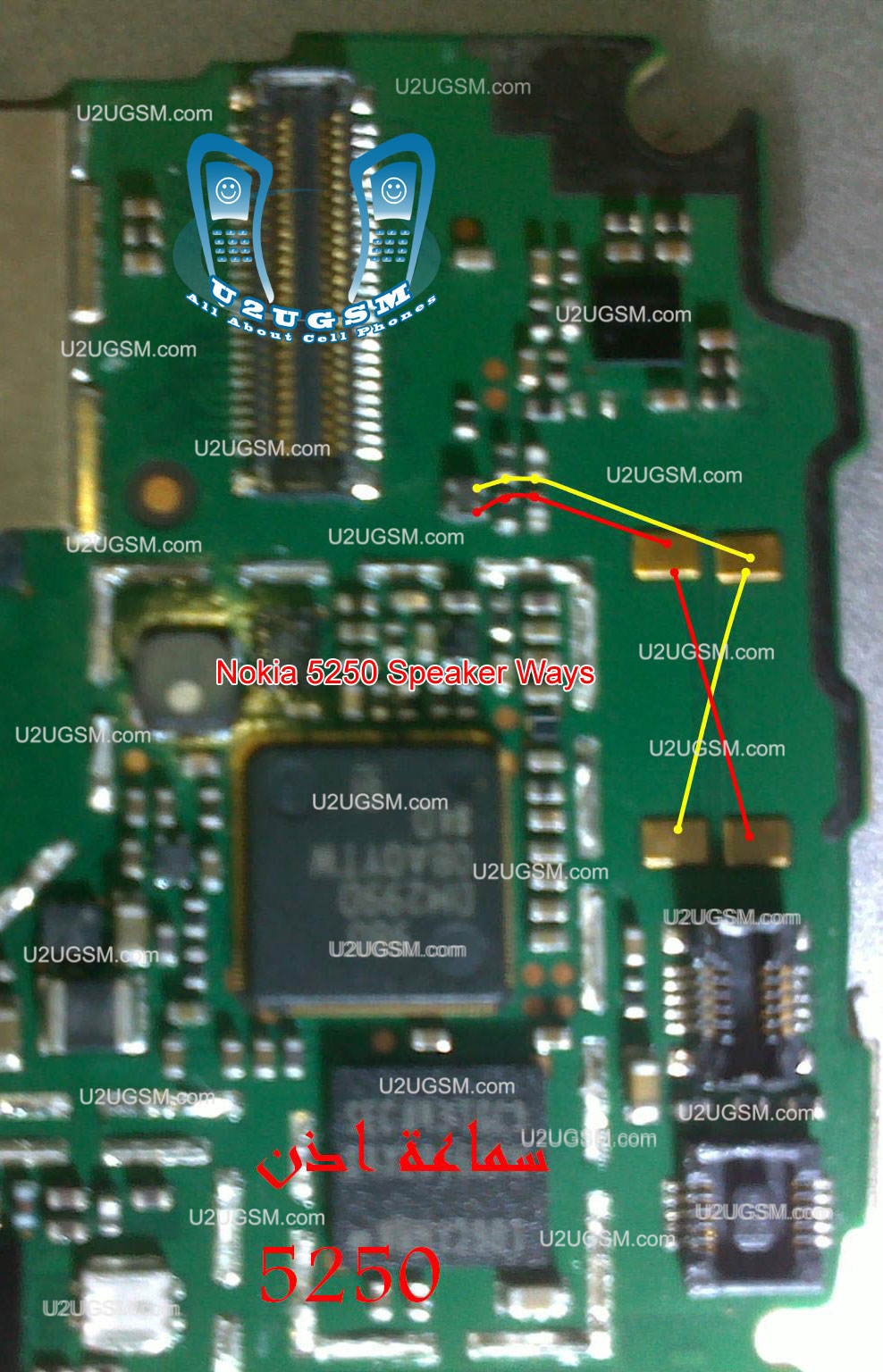
Nokia 5250 Speaker Ere Peace Not Working Problem Solution Jumpers

Nokia 5250 cellphone Speaker Honorary Peace is not working Problem Solving Jumpers are available in this chart is posted in this post.some times we face the Nokia 5250 cellphone speaker problem in a low voice or no voice call works for some time, but speaker works not, while in other cases speaker works, but does not ring all these problems you should follow a few steps given below and the problem will be solved easily and quickly.Nokia 2323 Classic speaker ear piece problem solution jumper ways


In the first step, whether mobile phone volume up and not too low or the setting profile.then check speaker of Nokia 5250 with one meter and as do not show continuity to modify and replace it.If speaker shows the continuity check or those items that are defined in the cellphone diagram above. Check out these links and make these jumpers as one of them is missing.in diagram top left you a color chart to determine color scheme for the chart to see.
for more detail and new tips and tricks about cellphone service problem keep visiting this page we will update cellphone service diagrams timely with new cellphone diagrams.some related post are also given bellow you can read them also for more information about cellphone.
Sunday, September 21, 2014

Nokia C5 03 Volume Keypad Lock keys not working Solution

If keypad lock key or volume keys are not working in Nokia C5-03 It can be cause or key damages or water damages in the mobile phone.If smartphone keys are not working you can do these steps that are given in this post and diagram bellow.nokia c1-01 light problem solution jumpers Tested 100%
Nokia C5-03 Volume Keypad Lock keys not working Solution
After dis assemble of Nokia C5-03 look at mother board and If you found some rust carbon or water damages then it can also be cause of Nokia C5-03 keys problem to solve and fix keys problem in Nokia C5-03 clean all the rust and carbon with electronics cleaner and apply hot air to make it dry.
In above diagram you can see some different color lines. These lines are tracks and paths of keys button switch that are used for keypad lock and volume of keys button switch.
Check all these tracks with meter and apply jumpers. If these key switches are not working then you can replace volume and keypad lock buttons.
for more detail and new tips and tricks about cellphone service problem keep visiting this page we will update cellphone service diagrams timely with new cellphone diagrams.some related post are also given bellow you can read them also for more information about cellphone.


Monday, September 15, 2014

Karbonn A4 Hard Reset 100 Working Solution

Karbonn A4 Hard Reset 100% Working Solution

Press Volume Down Button & Power Button for 5 Seconds.
Then It Shows Factory Test Menu Functions.
In Here Select the "Clear Flash" Option. U r Done.
Now Phone Will be Automaticaly Restarted.
Now the Phone is Ready to Use. 100% Tested Solution By Me.....

Monday, August 25, 2014

Samsung Galaxy S4 i9505 IMEI repair done! Guide inside 100 working

1. USB debuging on
2. Root manualy with CF-Auto-root (flashed via ODIN in PDA section)
3. *#7284# - set "UART" to PDA (Default is PDA)
4. *#0808# - set "USB" to AP (Default is AP) ,,,, set "USB settings" to DM+MODEM+ADB (Default is MTP)
5. *#9090# - select "[4]DM over UART(*)" ,,,, phone will reboot.
6. Connect phone with usb (install drivers if needed)
7. Select box comport in z3x
8. Repair button in z3x, fill IMEI.
Sony Xperia M C1905 User Guide Manual Free Download Now
Phone will check for root, write data, then it will reboot. After reboot connect phone with c3300k microUART rj45 cable (if its stuck on "Checking phone at COMxx..." then quickly *#9090# - "DM over UART", u should have enough time to reboot phone while z3x still searching on comport). z3x will write IMEI and reboot phone. All done!. Phone may search for network little bit longer but it will sign into network after while (max 2mins).

I was experiencing some troubles to get 3G working properly. However, after flash of firmware and wipe data and cache afterwards everything works as it should, expect that phone is searching for network one minute, max two (WEIRD).

LOG:
Code:
Selected model: I9505
Selected port: COM18 Z3X BOX Serial Port
Selected port speed: 115200
Searching ADB device... OK
Reading phone info...
Model: GT-I9505
Android version: 4.2.2
Product code: Not Active
Phone version: I9505XXUAMDM
PDA version: I9505XXUAMDM
CSC version: I9505OXXAMDB
IMEI: Unknown
Checking Super user right... true
Writing data to phone... OK
Rebooting phone... OK
Now connect phone to UART cable
Checking phone at COM18 OK
Reading phone info...
Model: GT-I9505
Country code: O2U
Cal date: -
Factory SW: I9505XXUAMDM
Unique number: CAF00D0198EE940
Memory phone: -
Bypass MSL... OK
Repairing IMEI... OK
Rebooting... OK
Repair done
Done with Samsung Tool v.14.9

Thursday, June 12, 2014

Nokia Asha 200 Power Button On Off Switch Not Working Problem

if you have a Nokia Asha 200 dead they may can have a power switch on off problem so please in first step plug in a charger and if Nokia Asha 200 is charging proper and well but not getting on it means the main problem can be power switch on off fault.Nokia 1200 1208 Light Problem Solution with Jumpers 100% tested Without IC

so for this you have to change power switch button on off button in Nokia Asha 200 if prints are also damge in Nokia Asha 200 for on off button then here is a full path and track for power switch button in diagram that is attached with this post so check all this path and track for power switch on off button in Nokia Asha 200 and if any of these links broken than make these jumpers as shown in diagram with red line while blue color is indicated for ground print.
for more detail and new tips and tricks about this problem keep visiting this page we will update it timely with new diagrams.some related post are also given bellow you can read them also for more information.

Thursday, May 8, 2014

Nokia 105 Speker ok but no ringer working

Nokia 105 Speker ok but no ringer working noika 105 not ring tone, ic ring 105, nokia 105 no ringer, nokia 105 tone ic solution, nokia105 ear ok but not ringing, nokia 105 not ringing solution, nokia 105 ringer i c jumper, ringing nokia 105 with out ic jumper nokia 105 ringer ic jumper , 105 no ringtone , nokia 105 no tones ,Nokia Asha 200 Keypad Not Working Ic Jumper Problem Solution.
Nokia 105 Speker ok but no ringer working
nokia 105 not ringing , nokia105 no ringtons , 105 no ring , nokia 105 not ring , jalur dering 105, 105 ringer ic, 105 buzzer problem, nokia 105 ear ok ringer not worke, Solution for nokia 105 not ringing , nokia 105 ringar ic jampar, nokia 105 ringer solution,

Tuesday, April 29, 2014

Nokia 3110c Camera Operation Failed Ways Camera Not Working problem Jumper solution here

Nokia 3110c Camera Not Working,
Nokia 3110c Camera Operation Failed,
Nokia 3110c Camera Problem,
Nokia 3110c Camera Jumper
Nokia 3110c Camera Ways
Nokia 3110c Camera Solution,
Nokia 3110c


Wednesday, April 16, 2014

Nokia Asha 311 WiFi Not working Problem Solution Ways

WiFi is used for networking a Smartphone with some other networking devices and it works for VPN (Virtual Private Network ) to gain a high speed broadband speed at you smart phone.
Nokia Asha 311 WiFi Not working Problem Solution Ways
in above diagram you can see a red line that identify parts used in wifi function in Nokia Asha 311.So after disassemble of mobile phone look all these parts very carefully and if there is some rust or water damages clean them with electronics cleaner and apply smoth heat with hot air. do not apply to much air because it can harm your skin and also can damage the mother board.
So re flow resold these parts and if it can not solve problem replace these parts that are given in above diagram.
for more detail and new tips and tricks about cellphone service problem keep visiting this page we will update cellphone service diagrams timely with new cellphone diagrams.some related post are also given bellow you can read them also for more information about cellphone.

Tuesday, April 8, 2014

Nokia X1 01 light solution 1000 working

Nokia X1-01 light solution 100% working solution see this solution 100%
 tested many time me see step by step and enjoy it

Thursday, March 20, 2014

Acer liquide unlock solution 100 working

THIS TUTORIAL IS MADE BY MY OWN AND OWN EXPERIENCE NOT A SITE TUTORIAL AND IT WORKED FOR ME.(DISCOVERED SOLUTION BY PURE HAZARD LOL).
SO THE STEPS GIVEN BELOW WILL GUIDE YOU/.
01- install liquide drivers : acer liquide drivers
http://www.megaupload.com/?d=E5PTHL3O
http://code.google.com/p/acer-liquid-malez-recovery/wiki/howToInstall
02- go to acer support site and download the latest liquide update.(.exe file) not bin or img.
03- for unlock download this file http://www.mcboydesign.fr/media/acer.../amss_mode.zip
04- install the liquide update to your pc without updating the phone.not yet.be patient.
05- youll find a file called desimlock.xml inside the amss mode.zip folder copy it and past it into the c:qcn

Tuesday, March 18, 2014

Nokia Asha 300 Mic Not Working Problem Solution Jumpers

If you are facing mic problem low voice or not voice out going to destination then this diagram will help you to solve mice problem in nokia asha 300. In diagram bellow you can see a mic that is defined with red boarder and some parts are also defined with red line boarder.

So we have to check all these parts that are in red board to solve mic problem and mic not working problem in nokia asha 300.check mother board vary carefully if there is any rust carbon or water damage issue. Clean mother board form these areas and apply some heat with hot air so that mother board of nokia asha 300 can be dry.
If with only service it can not be solved change mic and you can remove mic with hot air or solding iron. In nokia asha 300 mic has 4 points itself and one is ground other are data clock points. so we can apply jumpers in these point.
for more detail and new tips and tricks about cellphone service problem keep visiting this page we will update cellphone service diagrams timely with new cellphone diagrams.some related post are also given bellow you can read them also for more information about cellphone.

Wednesday, March 12, 2014

Nokia 2330 Classic Bluetooth and FM Not working Problem Solution

Nokia 2330 Classic Bluetooth is used for data transfer between devices with Bluetooth.In Nokia 2330 Classic Bluetooth can be damage or not working due to water damages and rust.It can be fault for shortage and burned parts.Nokia C2-01 Keypad is Not Working Problem Solution
Nokia 2330 Classic Bluetooth and FM Not working Problem Solution
In above diagram you can see some parts that are in lined with red color. Clean these parts after disassemble with electronics cleaner and then apply some hot air so that it can be dry.Do not apply much air with hot air station because it can harm your skin or may can damage the mother board of Nokia 2330 Classic.
These parts are also used in FM function so if FM Radio is not working in Nokia 2330 Classic you can also re flow and resold these parts that are identify in the above diagram.
for more detail and new tips and tricks about cellphone service problem keep visiting this page we will update cellphone service diagrams timely with new cellphone diagrams.some related post are also given bellow you can read them also for more information about cellphone.
Saturday, March 8, 2014

nokia 101 speaker not working solution

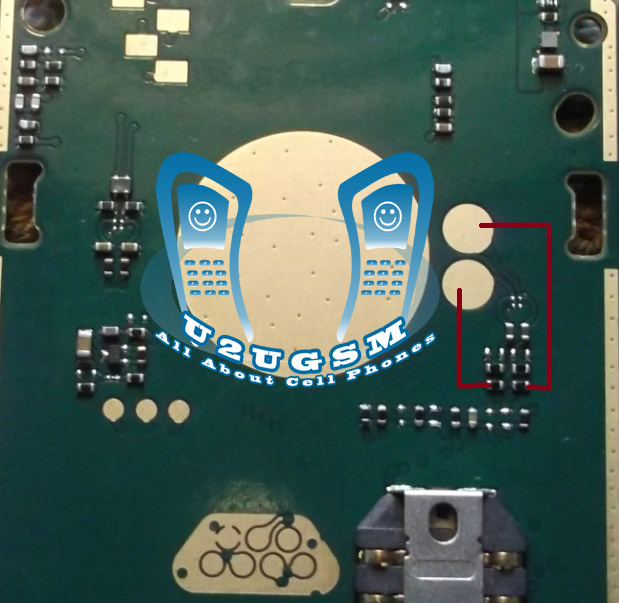
nokia 101 speaker not working problem can be cause of water damages. It may can be due to damage and burn parts.In repairing diagram bellow some parts and tracks are identified. All these path and parts are used in Speaker function of nokia 101.
nokia 101 speaker not working
Both red and blue color lines are showing tracks to solve nokia 101 speaker ear peace problem. check all these points and if any of these path is missing apply jumpers as shown in above speaker repairing diagram for nokia 101.

Wednesday, March 5, 2014

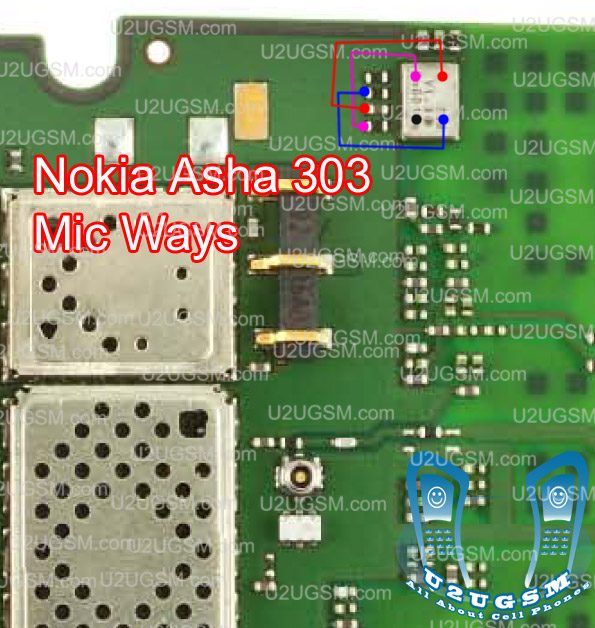
Nokia Asha 303 Mic Not Working Problem Solution Jumpers

If you are facing mic problem low voice or not voice out going to destination then this diagram will help you to solve mice problem in nokia asha 303. In diagram bellw you can see a mic that is defined with red boarder and some parts are also defined with red line boarder.All cellular mobile repair solution here Nokia 2320 Classic Ringer Problem Jumper Ways Solution
So we have to check all these parts that are in red board to solve mic problem and mic not working problem in nokia asha 300.check mother board vary carefully if there is any rust carbon or water damage issue. Clean mother board form these areas and apply some heat with hot air so that mother board of nokia asha 303 can be dry.
If with only service it can not be solved change mic and you can remove mic with hot air or solding iron. In nokia asha 300 mic has 4 points itself and one is ground other are data clock points. so we can apply jumpers in these point.
for more detail and new tips and tricks about cellphone service problem keep visiting this page we will update cellphone service diagrams timely with new cellphone diagrams.some related post are also given bellow you can read them also for more information about cellphone.

Wednesday, February 26, 2014

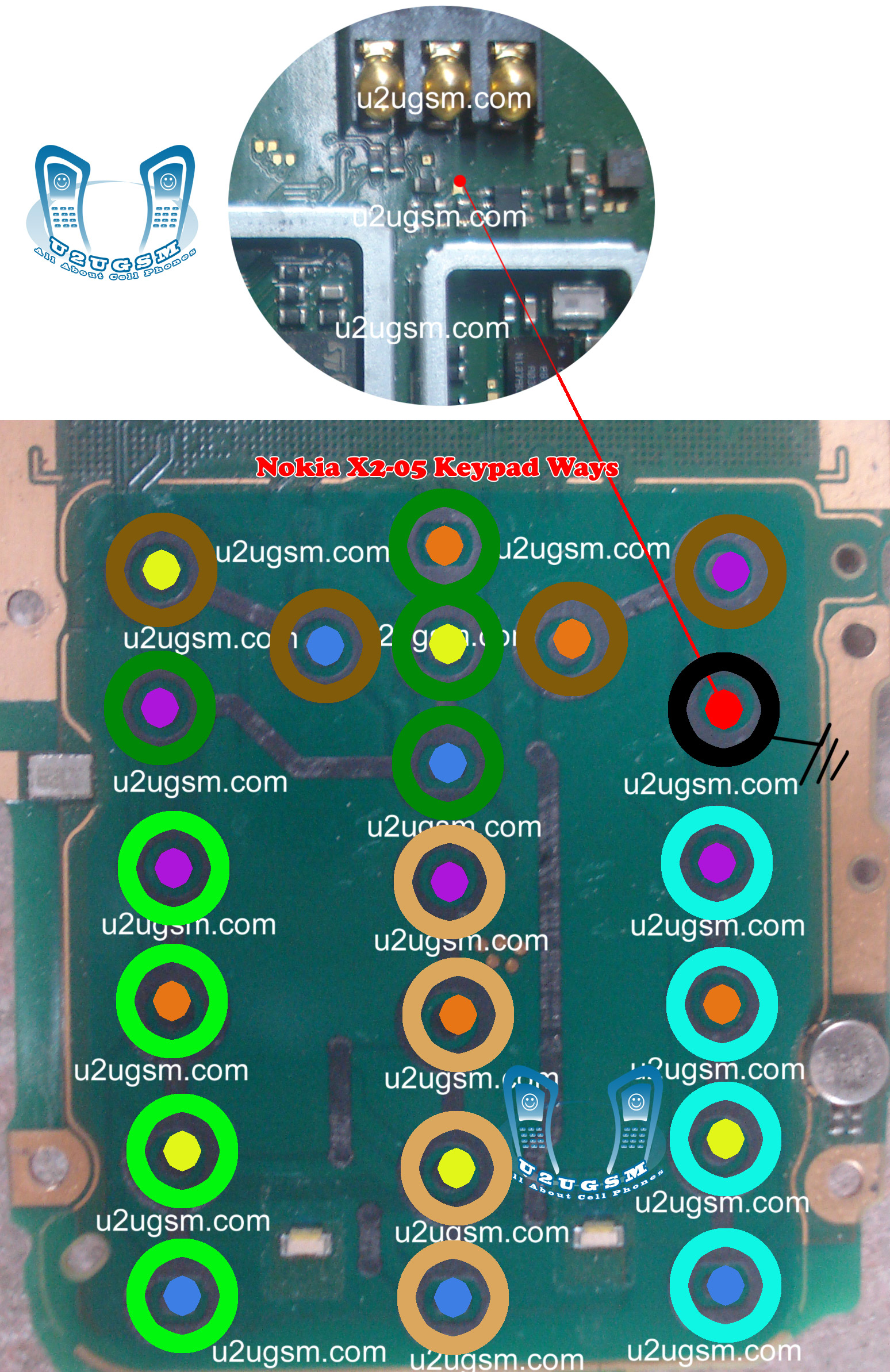
Nokia X2 05 Keypad Not Working Problem Solution Jumper Ways

Nokia X2-05 keypad is not working, A few keys of Nokia X2-05 are not working, Keypad Hang and double values when press a single time. Or un proper keypad functions.nokia Asha 203 ight problem solution with jumpers
Nokia X2-05 Keypad Not Working Problem Solution Jumper Ways
In all above cases and problem we can follow this post to solve Nokia X2-05 keypad problem in a few steps. If you press a single key and some other keys are also working it can be cause of water damages and rus, carbon. If you press keys and they do not reflect any process it can be problem of missing push button, missing components, burn parts.
After dis assembly of Nokia X2-05 look at the motherboard for rust carbon or burn parts. If you found some rust or carbon apply electronics cleaner on the mother board and apply hot air to make it dry proper.
Applying too much heat can damage the mother board and parts.It also can be harm for your skin.So keep in mind about normal heat flow when making it dry.
In above diagram you can see some different color lines all these different color inner and outer keys have same value according to the color schame. So if a single key is not working we can check its inner and outer value with meter and apply jumper from the other one which is working in normal condition.
If all keys are not working we can re sold and re flow Keypad IC. If replacement can not solve the keypad problem in Nokia X2-05 we have to replace it with new one.
In this diagram you can also see Nokia X2-05 On Off Power Button ways and jumpers.

Sunday, February 2, 2014

Infinity Best Cracked V1 67 Lastest Version 100 working and many phone supported

Infinity Best Cracked V1.67 Latest Version 100% working and many phone supported 
Infinity Best Cracked V1.67 Lastest Version
BEST V 1.67

- USB flashing improved
WP7x flashing revised
MeeGo eMMC only flashing improved (If Wipe Not ticked - all apps (only apss!) will be saved)

- User Data operations improved
Some S40 PhoneBook direct extraction was broken. Fixed.
Improved S4pb cross-writing
Some other fixes
- Added Nokia Firmware Manager (NaviFirm)
- Fast and Easy
- Have all newest phones inside
- Download ONLY needed files for flashing, no any garbage
- Standalone , no any servers, delays and e.t.c.

- Ini updated and revised
Added "Check DataPackage". This option fix filenames, if BEST warn about misssing files.
*Settings - > Check DataPackage
Some other fixes and improvements at all

Infinity Best Cracked V1.67