
Showing posts with label power. Show all posts
Showing posts with label power. Show all posts
Sunday, October 19, 2014

Sunday, September 28, 2014
Nokia 111 No Power On with Battery Problem Solution
1-Nokia 111 is not getting power on with battery.
2-Nokia 111 is dead and not getting power on with battery.
3-But it can be switch on with direct power supply of 4v.
Nokia 5250 LCD Display problem Ic Solutions

Tools:-
To solve this problem you should have
1-Any electronics cleaner.
2-Hot Air Machine.
3-Solding Iron.
4-And same mother board if a few components required.
Solution:-
1-Check Nokia 111 with new battery and try to switch on.
2-If it can not be power on with battery then check with Power Supply.
3-Disassamble Nokia 111 and look at mother board very carefully.
4-If there is some rust or carbon on board then clean it with electronics cleaner.
5-Apply hot air with Hot air gun. Here should not be much heat because it can harm you and Mobile
Phone.
6-Check Mobile phone with battery if it can be power on with it.
7-If not working with above process then change these parts as shown in above diagram.
Warnings:-
1-Do not apply to much heat it can be harm for your skin and mobile.
2-Do not apply to much cleaner it can be cause of rust or carbon if you do not make your phone dry.
for more detail and new tips and tricks about cellphone service problem keep visiting this page we will update cellphone service diagrams timely with new cellphone diagrams.some related post are also given bellow you can read them also for more information about cellphone.
2-Nokia 111 is dead and not getting power on with battery.
3-But it can be switch on with direct power supply of 4v.
Nokia 5250 LCD Display problem Ic Solutions
Tools:-
To solve this problem you should have
1-Any electronics cleaner.
2-Hot Air Machine.
3-Solding Iron.
4-And same mother board if a few components required.
Solution:-
1-Check Nokia 111 with new battery and try to switch on.
2-If it can not be power on with battery then check with Power Supply.
3-Disassamble Nokia 111 and look at mother board very carefully.
4-If there is some rust or carbon on board then clean it with electronics cleaner.
5-Apply hot air with Hot air gun. Here should not be much heat because it can harm you and Mobile
Phone.
6-Check Mobile phone with battery if it can be power on with it.
7-If not working with above process then change these parts as shown in above diagram.
Warnings:-
1-Do not apply to much heat it can be harm for your skin and mobile.
2-Do not apply to much cleaner it can be cause of rust or carbon if you do not make your phone dry.
for more detail and new tips and tricks about cellphone service problem keep visiting this page we will update cellphone service diagrams timely with new cellphone diagrams.some related post are also given bellow you can read them also for more information about cellphone.
Wednesday, August 27, 2014
Nokia Asha 203 On Off Power Button Jumper Ways
Nokia Nokia Asha 203 On Off Power Button Jumper Ways 100% Tested

Thursday, June 12, 2014
Nokia Asha 200 Power Button On Off Switch Not Working Problem
if you have a Nokia Asha 200 dead they may can have a power switch on off problem so please in first step plug in a charger and if Nokia Asha 200 is charging proper and well but not getting on it means the main problem can be power switch on off fault.Nokia 1200 1208 Light Problem Solution with Jumpers 100% tested Without IC

so for this you have to change power switch button on off button in Nokia Asha 200 if prints are also damge in Nokia Asha 200 for on off button then here is a full path and track for power switch button in diagram that is attached with this post so check all this path and track for power switch on off button in Nokia Asha 200 and if any of these links broken than make these jumpers as shown in diagram with red line while blue color is indicated for ground print.
for more detail and new tips and tricks about this problem keep visiting this page we will update it timely with new diagrams.some related post are also given bellow you can read them also for more information.

so for this you have to change power switch button on off button in Nokia Asha 200 if prints are also damge in Nokia Asha 200 for on off button then here is a full path and track for power switch button in diagram that is attached with this post so check all this path and track for power switch on off button in Nokia Asha 200 and if any of these links broken than make these jumpers as shown in diagram with red line while blue color is indicated for ground print.
for more detail and new tips and tricks about this problem keep visiting this page we will update it timely with new diagrams.some related post are also given bellow you can read them also for more information.
Thursday, March 6, 2014


Tuesday, February 18, 2014


Friday, February 14, 2014
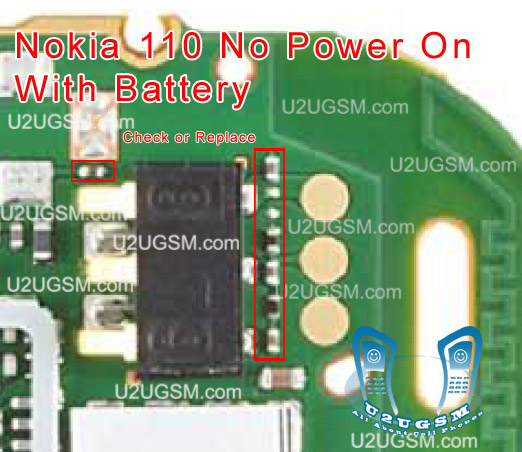
Nokia 110 No Power On with Battery Problem Solution
1-Nokia 110 is not getting power on with battery.
2-Nokia 110 is dead and not getting power on with battery.
3-But it can be switch on with direct power suplly of 4v.
Nokia 5250 Keypad Not Working Jumper Problem Solution

Tools:-
To solve this problem you should have
1-Any electronics cleaner.
2-Hot Air Machine.
3-Solding Iron.
4-And same mother board if a few components required.
Solution:-
1-Check Nokia 110 with new battery and try to switch on.
2-If it can not be power on with battery then check with Power Supplu.
3-Disassamble Nokia 110 and look at mother board very carefully.
4-If there is some rust or carbon on board then clean it with electronics cleaner.
5-Apply hot air with Hot air gun. Here should not be much heat because it can harm you and Mobile
Phone.
6-Check Mobile phone with battery if it can be power on with it.
7-If not working with above process then change these parts as shown in above diagram.
Warnings:-
1-Do not apply to much heat it can be harm for your skin and mobile.
2-Do not apply to much cleaner it can be cause of rust or carbon if you do not make your phone dry.
for more detail and new tips and tricks about cellphone service problem keep visiting this page we will update cellphone service diagrams timely with new cellphone diagrams.some related post are also given bellow you can read them also for more information about cellphone.
2-Nokia 110 is dead and not getting power on with battery.
3-But it can be switch on with direct power suplly of 4v.
Nokia 5250 Keypad Not Working Jumper Problem Solution

Tools:-
To solve this problem you should have
1-Any electronics cleaner.
2-Hot Air Machine.
3-Solding Iron.
4-And same mother board if a few components required.
Solution:-
1-Check Nokia 110 with new battery and try to switch on.
2-If it can not be power on with battery then check with Power Supplu.
3-Disassamble Nokia 110 and look at mother board very carefully.
4-If there is some rust or carbon on board then clean it with electronics cleaner.
5-Apply hot air with Hot air gun. Here should not be much heat because it can harm you and Mobile
Phone.
6-Check Mobile phone with battery if it can be power on with it.
7-If not working with above process then change these parts as shown in above diagram.
Warnings:-
1-Do not apply to much heat it can be harm for your skin and mobile.
2-Do not apply to much cleaner it can be cause of rust or carbon if you do not make your phone dry.
for more detail and new tips and tricks about cellphone service problem keep visiting this page we will update cellphone service diagrams timely with new cellphone diagrams.some related post are also given bellow you can read them also for more information about cellphone.
Subscribe to:
Posts (Atom)